Signing in and access
Roles
A role says what someone may do and see beyond the lines granted to them. Each holds a set of permissions, ticked under Configure → Roles:
| Permission | Allows |
|---|---|
| See every line's calls | every call, line and figure, not just granted ones |
| Hear every recording and voicemail | without a grant's ticks |
| Read every transcript | without a grant's tick |
| Read the audit log | who changed, played, read and exported what |
| Export calls | CSV and Parquet |
| Make API tokens | for scripts and other tools |
| Mark missed callers done | on the call-back list, and assign them to someone |
| Set up their own alerts | channels and flows for their own lines |
| Manage every alert | and the mail and Telegram settings |
| Manage people | people, roles, grants and group mappings |
| Manage retention | how long calls and audio are kept |
| Set up reports | reports and their schedules, and every copy |
| Choose who holds which role on a number | under Configure → Numbers |
Three roles are built in:
- Admin — every permission. It can't be changed, so there's always someone who can put things right, and the last Admin can't be demoted.
- Manager — starts as it always was: its lines, export, API tokens, call-backs, and alerts for its own lines.
- Viewer — starts as it always was: its lines, export, API tokens and call-backs.
Manager and Viewer can be changed, and admins can add roles of their own: a Supervisor who sees every call and hears every recording but reads no transcripts and changes nothing, say. A role someone holds can't be removed until they have another. A change holds from the next page someone opens: permissions are read from their roles on every request rather than kept from when they signed in, so nobody has to sign out and back in, and nobody is signed out for it.
Lines and grants
What a Viewer or Manager sees is decided by lines, and by any roles they hold on a number. Lines are the numbers, extensions (people), switchboards, ring groups and queues a call went through. A call touches every line it passed on its way — the number it came in on, the switchboard that answered, each extension that rang, whoever's voicemail it reached — and a grant on any one of them covers the whole call.
Lines are fixed when a call is stored, from the console's configuration at that moment. Moving a number to another ring group next month doesn't rewrite last month's calls, so who could see a call doesn't change after the fact.
Each grant also carries two ticks: recordings and voicemail. Without them, a person sees the call but not the player, and the audio address answers 404, the same as for audio that doesn't exist, so it gives nothing away.
A third tick, transcripts, works the same way for what was said: without it a person sees the call but not its transcript, and a transcript search finds nothing in it. A transcript is the most sensitive thing TalkWatch holds, so it's ticked separately from hearing the call. Reading one is audited, as playing a recording is. An alert about a call Talk rated negative says which call, never what was said, because a channel's grants are checked for the call's lines and not for transcripts.
The same rules apply everywhere a call can surface: the calls page, the dashboard's figures, CSV exports, the API, and alerts sent to a person's own channel.
There is one exception, and it's deliberate. Someone who carries an outside phone Talk puts calls through to (Configure → Outside phones) can be told who is calling while it rings, whether or not they may see the line: they're about to answer the call, so they'd hear the caller anyway. They're told the caller's number and name, the number rung and when, and nothing more. No summary, transcript or voicemail, and no link to the call. Only an admin can build a flow that does this. See alerts.
Roles on a number
A site with more than one number often has someone who looks after each: the sales line's manager shouldn't need a grant on every extension behind it, and shouldn't see the support line at all. So someone can hold a role on a number, Manager on one and Viewer on another, as well as the role they hold site-wide. Configure → Numbers lists who holds which role on each number.
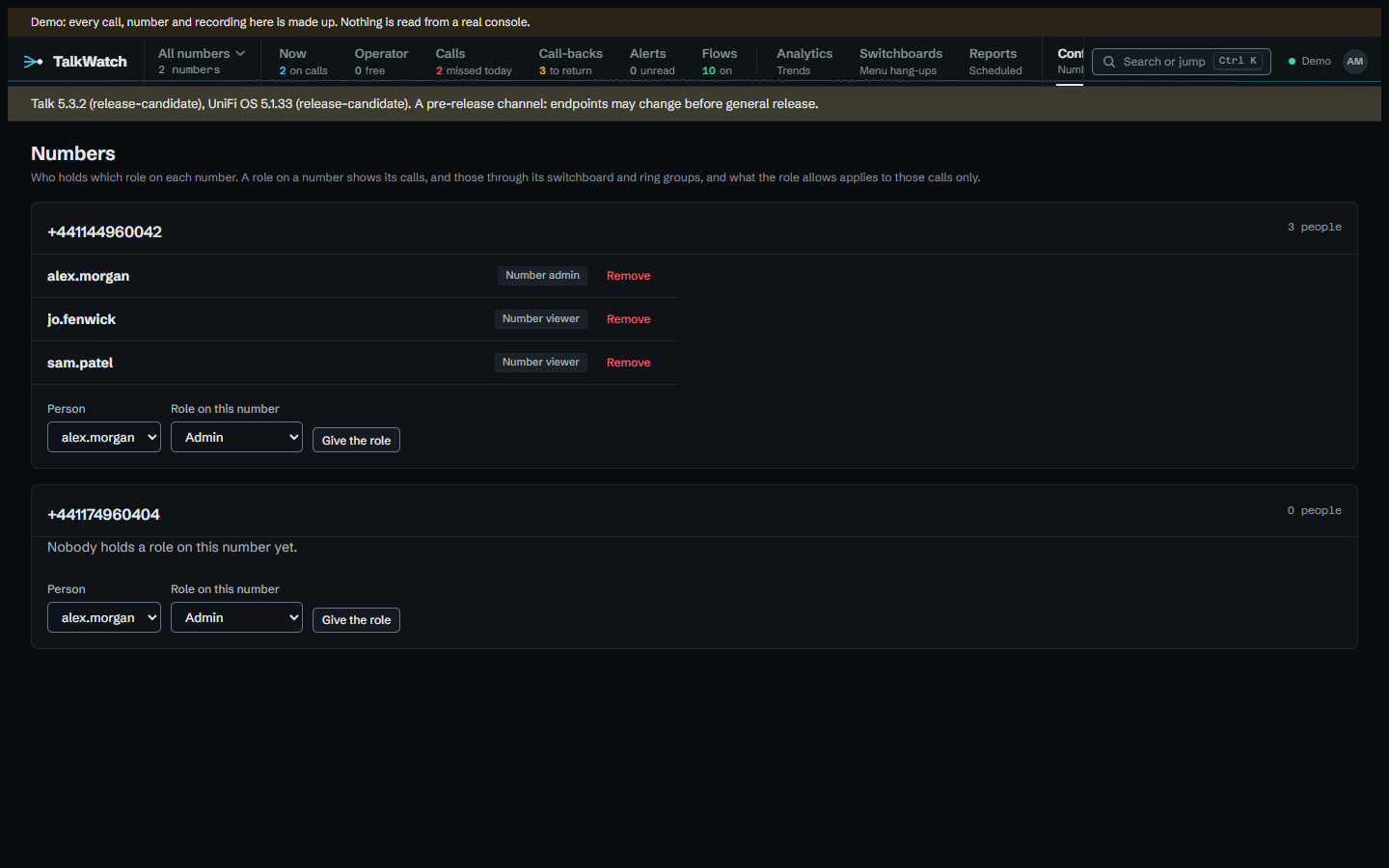
A role on a number shows that number's calls: those that came in on it, and those through the switchboards and ring groups it routes calls to, as the console's configuration says. People aren't followed, on purpose. One person can take calls from several numbers, and following them would carry one number's calls into another's.
On a number, a role only does what's about that number's calls: hearing recordings and voicemail, reading transcripts, exporting, marking and assigning call-backs, setting up their own alerts and flows, setting up reports for it, and choosing who holds which role on it. Anything else the role holds, such as managing people or retention, is ignored there, so a role on a number can never reach the rest of the site. Site-wide permissions stay site-wide.
Someone may give roles on a number if they manage people, or if a role of theirs, on that number or site-wide, lets them choose who holds roles. Without managing people, they can only give or take away roles that are within what they hold there themselves, so nobody can raise anyone, themselves included, above their own reach.
Roles on numbers are read on every page, as grants are, so taking one away holds from the next page. They start empty: an upgrade changes nobody's access.
Looking at one number
The switcher beside the brand on the rail says which calls TalkWatch is showing: every number, or one. Choosing a number narrows every call page to that number's calls, through the same filter that decides what each person may see, so no page can forget it. Only numbers you can see are offered. The choice is kept on your account and follows you to other devices until you choose all numbers again. The switcher is tinted while it's narrowed, so a view of one number never passes for the whole picture.
Call-backs
Whoever may mark missed callers done may also assign them, from the menu beside Mark done on Call-backs: to someone who's to return the call, or to nobody in particular, as a flow's Assign step does. It's the same people, on the same calls: those they can see, and, without the permission site-wide, only on numbers where a role of theirs allows it. Assigning is audited, as marking done is.
A person's page
Besides their role, lines and two-factor sign-in, a person's page under Configure → People holds:
- Email — their account email, and where their reports go. Signing in through an identity provider sets it again at every sign-in, so a change made in the provider arrives next time they sign in, and one made here lasts until then.
- Reporting address — where their reports go instead, when it isn't their email. A sign-in never changes it. Empty, reports go to their email.
- On the phone system — which Talk user they are. It's what lets a flow's whoever it rang and whoever is free in a ring group reach them; someone not linked is never told.
- Carries the outside phone of — the outside numbers Talk puts calls through to that this person answers, so a flow can tell them who's calling while it rings. Configure → Outside phones shows every one and who carries it.
Passwords
Passwords are at least 12 characters, with no rules about digits or capitals: length does more than composition, and forced symbols push people towards Password1!. Five wrong passwords lock an account for 15 minutes, and a single address gets ten sign-in attempts a minute whatever the account, which slows guessing across many accounts.
Nobody can demote or lock their own account, and the last admin who can sign in can't be demoted or locked.
Two-factor sign-in
Anyone can turn it on from Account, with an authenticator app (1Password, Google Authenticator and others). The page shows a setup key and an otpauth:// link, and the first code from the app turns it on. Ten recovery codes are shown once; each works once.
An admin can turn it off for someone who's lost their phone, from that person's page. Wrong codes count towards the same lockout as wrong passwords.
Signing in through an identity provider
TalkWatch can sign people in through an OpenID Connect provider, such as Authentik, alongside passwords. The password form stays, so the local admin still works when the provider is down. Set Oidc__Authority, Oidc__ClientId and Oidc__ClientSecret, and register https://<your address>/signin-oidc as the redirect address with the provider.
Groups decide who gets in, with what role and which lines, at every sign-in:
- Group mappings, under Configure → Groups, map a group to a role, to lines (each with its recordings, voicemail and transcripts ticks), or both. Where someone's groups map to different roles, the first mapping in order decides; the lines of every mapping their groups match are theirs, a line two groups grant taking the ticks of both.
- Someone in an
Oidc__AdminGroupsgroup is an Admin whatever is mapped, so a mistake on the mappings page can't lock admins out. They stop being one at their next sign-in once they leave the group. - Someone in an
Oidc__ViewerGroupsgroup, or a group mapped to lines only, gets in without a role being set: a new account is a Viewer, and an existing one keeps the role it was given by hand. - Anyone whose groups match none of these is turned away, and no account is made for them.
Lines from groups follow the groups: joining a group in the provider grants its lines at the next sign-in, and leaving it takes them away, so access is managed in one place. They're shown on the person's page as from group … and can't be changed there. Lines given by hand on a person's page are kept apart and never touched by a sign-in. A change to the mappings reaches each member at their next sign-in.
A first sign-in links to an existing account with the same username, or makes a new one. After that, the provider's own identifier for the person finds the account, so renaming them in the provider doesn't lose it. The provider's checks stand in for TalkWatch's two-factor code.
Every sign-in also keeps the person's email from the provider (Oidc__EmailClaim, email unless you say otherwise), so reports and email alerts can reach an account the provider made. And when nobody has linked the person to a Talk user yet, the Talk user with the same email is linked, so flows that tell whoever it rang reach them without anyone setting it by hand. A Talk user already linked to someone else is left alone.
Behind a reverse proxy, Proxy__TrustedNetworks must include the proxy; see Behind a reverse proxy.