TalkWatch
TalkWatch is a self-hosted dashboard and alert router for UniFi Talk on a UDM Pro or UDM SE. It copies your call history, voicemail and recordings off the console into its own database and storage, shows who's on a call right now, and tells the right people about missed calls, new voicemail and handsets dropping off — each person seeing only the lines they've been given.
It's built for a small site: tens of extensions and a few thousand calls a day. It's one container and a PostgreSQL database.
Not affiliated with Ubiquiti
TalkWatch reads the console's local API, which Ubiquiti doesn't document and can change in any update. When a response stops matching what TalkWatch expects, it stops writing rather than store something wrong, puts a banner on every page, and raises a drift alert. Nothing is lost while it waits for a fix: the console keeps its call log, and TalkWatch catches up once it can read it again.
Why it exists
Talk marks nearly every inbound call accepted. On the console TalkWatch was
built against, that was 151 of 155 inbound calls, whether someone answered, it
went to voicemail or the caller hung up at the switchboard; the other four were
spam Talk blocked. So Talk's own log can't tell you how many calls you missed.
TalkWatch reads each call's events instead and works out what actually
happened, and everything else here is built on that.
What it does
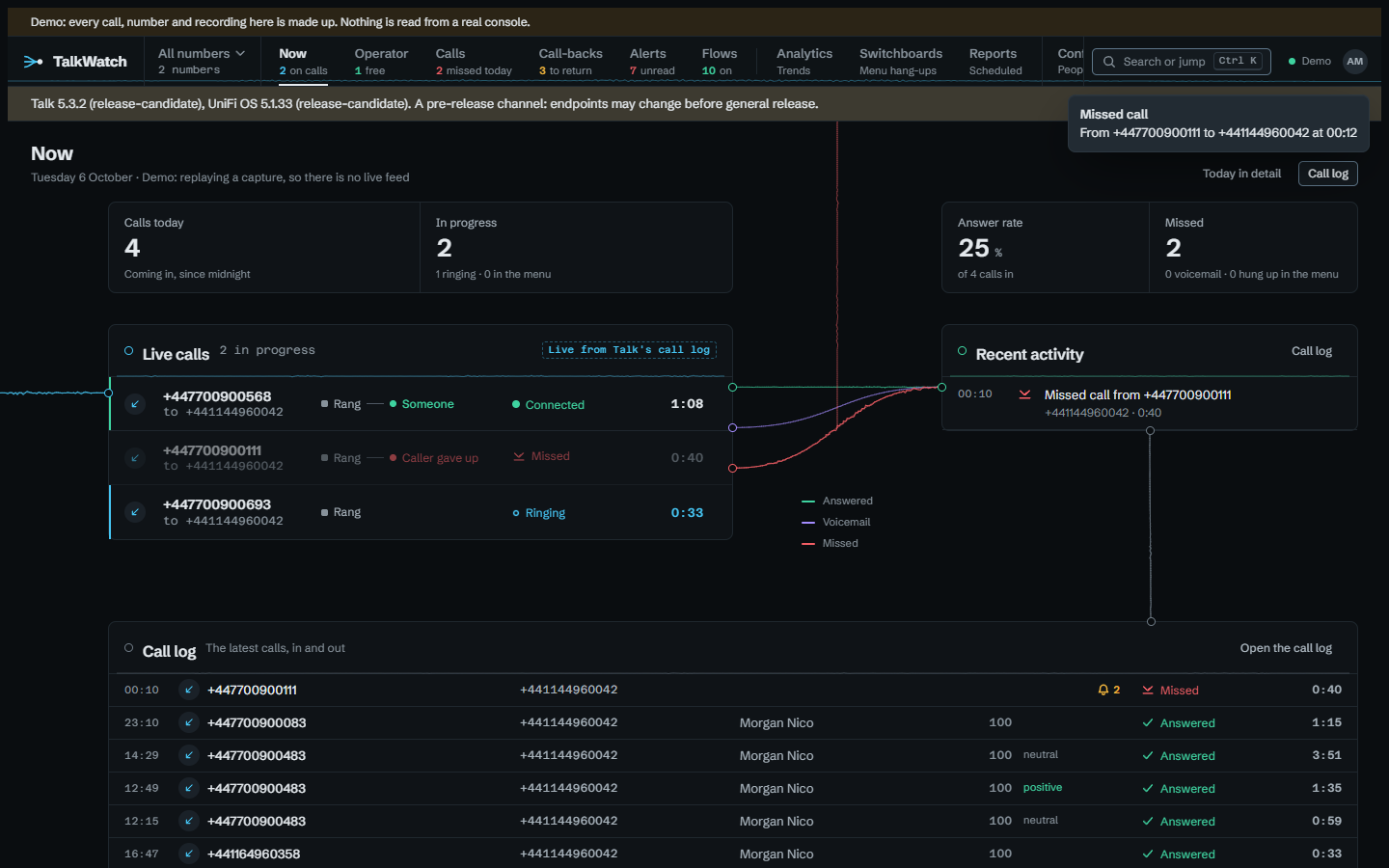
- Call history — every call, with its outcome worked out from what actually happened to it: answered, missed, voicemail or hung up at the switchboard.
- Transcripts, when Talk's AI transcription is on: Talk's summary and rating of each call, and what was said, searchable, for those granted them. A call Talk rates negative can start an alert flow.
- Recordings and voicemail, copied off the console, because consoles prune old audio and firmware updates have wiped app data before. Played in the browser, with every play audited.
- Now and Operator — two live boards, pushed as things change. Now, where TalkWatch opens, is laid out as calls move through the system: in, to how they ended, into the log, with today's figures, who's on a call and which handsets are online. Operator is for whoever looks after the phones all day: calls that need someone, everyone's presence by ring group, and callers waiting for a call-back. TalkWatch only reads Talk, so answering and transferring stay on the handset.
- Analytics — calls by outcome, answer rate, busiest hours, calls per day and per line, how many missed calls were got back to and how fast, how long phones ring before someone answers and how long missed callers wait before giving up, a weekday-by-hour grid of when calls go unanswered, and Talk's call-quality scores with the worst calls.
- Switchboards — how many callers hang up during each greeting, how long they last, how long the greeting itself is, and what each menu option leads to: answered, missed, voicemail or hung up.
- Caller names and history — a caller the call doesn't name is named from Talk's contacts, on the calls pages and in alerts, and each call's page lists the other calls with that number.
- Reports on a schedule (daily, weekly, monthly or cron), each reader's copy built with their own access, kept in TalkWatch.
- A call-back list — missed callers nobody has got back to yet. A caller leaves it when someone rings them back from any phone on the system, when a later call from them is answered, or when someone marks them done. A caller can be given to one person to ring back, by hand or by a flow.
- Alert flows — a trigger, the conditions it has to meet, then steps: notify, wait, branch, assign the call-back, or bundle a run of alerts into one message. They go out by ntfy, email, Telegram, a signed webhook, or In TalkWatch (a pop-up on any open page and desktop notifications), with quiet hours per channel and acknowledge links. A flow can be tried against the last seven days' calls before it's switched on.
- Outside phones and outside voicemail — when Talk puts a call through to someone's mobile, TalkWatch names who answered from the number, spots calls that ended on the mobile's own voicemail (which Talk logs as answered), and can tell whoever carries that phone who's calling while it rings.
- Access by line and by number. A person sees the calls on the numbers, extensions, switchboards and ring groups they're granted, and nothing else — Analytics, exports, the API and alerts included. A role can also be held on one number, so whoever looks after a number can be given its calls and what they may do with them there, and no more.
- One number at a time — a switcher on the rail narrows every call page to one of your numbers, and Ctrl+K opens a palette that searches calls, numbers and people and jumps to any page. See Finding your way round.
- Retention presets, CSV and Parquet export, and a read-only API.
What it doesn't do yet
- Ring groups are read from the console's configuration, and that's where everything TalkWatch does with them comes from: Operator's teams, "whoever in the group is free" in a flow, and which calls a grant on a group covers (a number or extension that routes to it). What isn't done yet is telling from a call record alone that it rang a group, because every captured call has its group field empty, so there's nothing to test that against.
- Trunk status isn't shown, and there's no trunk-offline alert, for the same reason: nothing captured so far shows it.
- One site per install, though every table already carries a site identifier.
- SMS isn't copied or shown. Talk offers it only in the US, and nothing outside the US can capture or test it.
Where to start
- Try the demo: the same image replaying a real console's capture, no console needed.
- Install it against your own console.
- Take the tour of what's on each page.