Giving someone their own number
A site with more than one number usually has someone who looks after each: a sales line and a support line, two practices sharing one console, a branch with its own number. The sales manager should see the sales line, set up its alerts and its Monday report, and not see support's calls at all. Talk has no way to say that. In TalkWatch it's a role held on a number.
A role on a number
Under Configure → Numbers, give a person a role on one number: Manager on sales, say. They then see that number's calls, those that came in on it and those through the switchboards and ring groups it routes calls to, and can do there what the role allows.
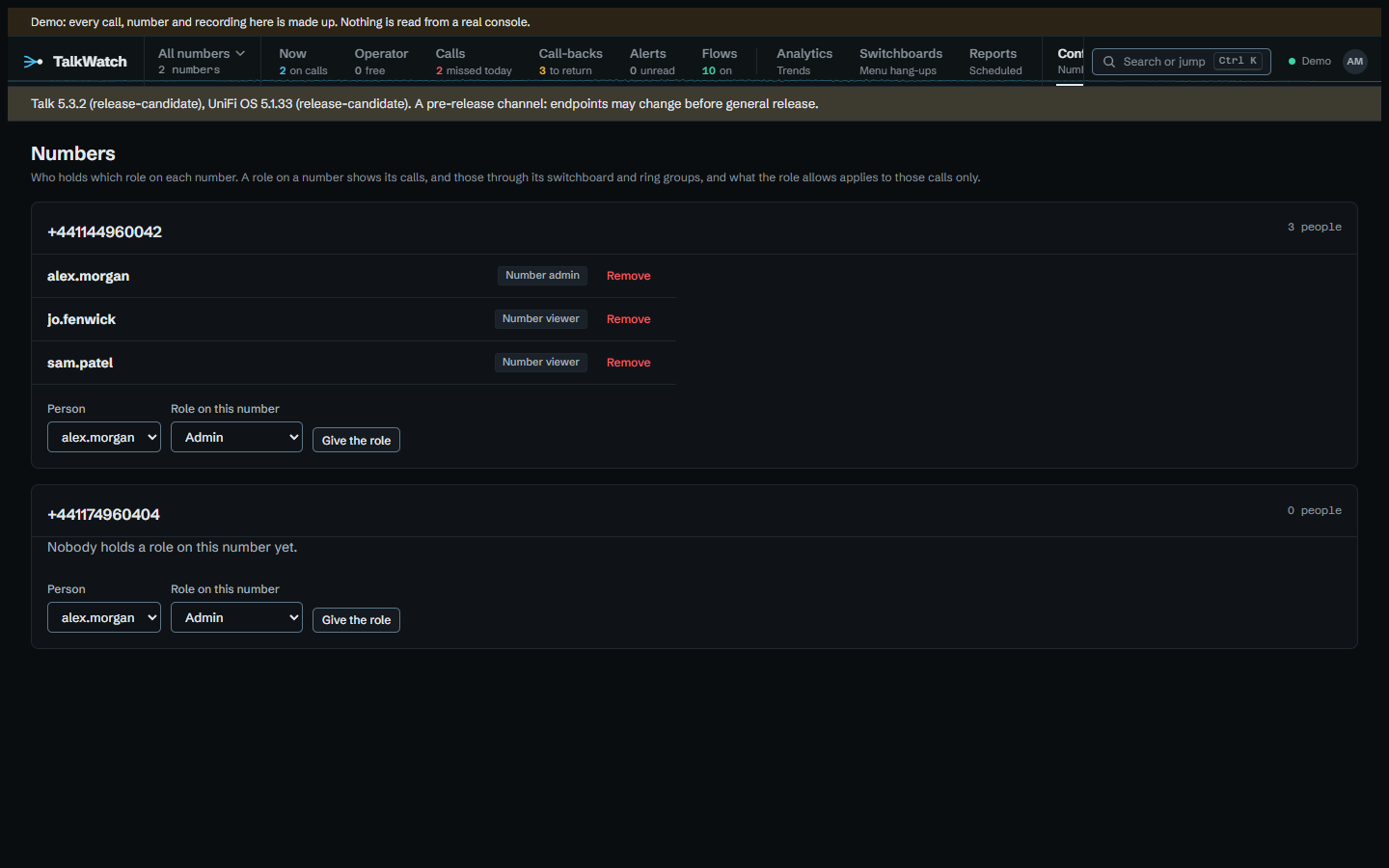
On a number a role only does what's about that number's calls: hearing recordings and voicemail, reading transcripts, exporting, marking and assigning call-backs, setting up their own alerts and flows, setting up reports for it, and choosing who else holds a role on it. Anything else the role holds, such as managing people, is ignored there, so a role on a number can never reach the rest of the site.
People aren't followed, on purpose. One person can take calls from several numbers, and following them would carry one number's calls into another's.
What the number's manager can then do
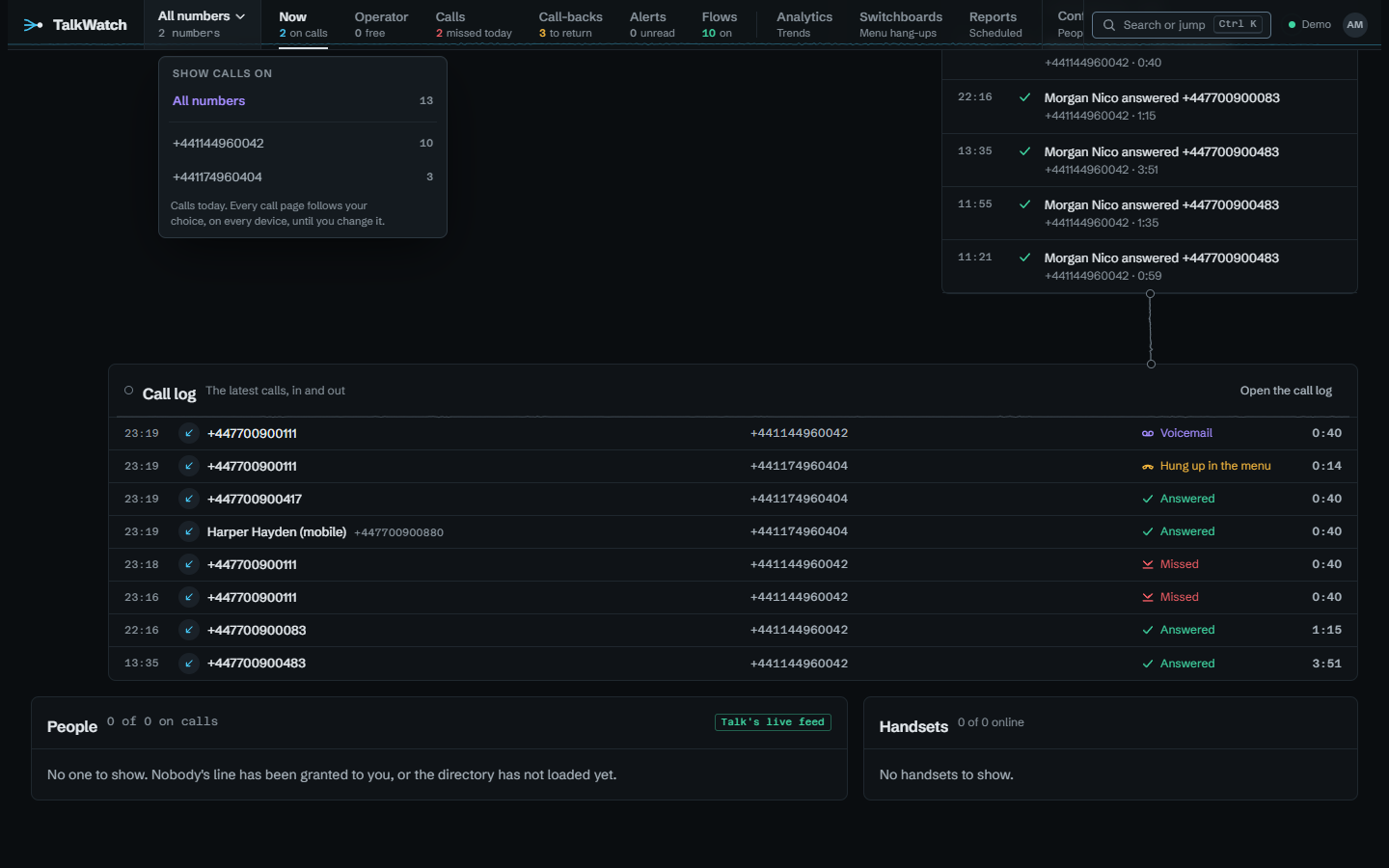
- See its calls everywhere: the call log, Now, Operator, Call-backs, Analytics and exports all show that number's calls and no others. Their counts on the rail are theirs.
- Set up its alerts, with set up their own alerts: their own channels, and flows that name only the lines they hold. See Alerts.
- Set up its reports, with set up reports: reports covering only the numbers they hold it on, sent to people and their own channels. See Reports on a number.
- Choose who else holds a role on it, with choose who holds which role on a number: give their team Viewer on the sales line without asking an admin, and never more than they hold there themselves.
Narrower still: lines and grants
For someone who should see less than a whole number, grant lines on their page under Configure → People: an extension, a ring group or a switchboard. A call touches every line it passed, so a grant on any of them covers the whole call. Each grant carries three ticks, recordings, voicemail and transcripts, so a receptionist can see the calls without hearing them, and a supervisor can hear recordings without reading transcripts, which are the most sensitive thing TalkWatch holds.
Roles of your own
Configure → Roles has Admin, Manager and Viewer, and room for your own: a Supervisor who sees every call and hears every recording but reads no transcripts and changes nothing, say. A change holds from the next page someone opens, so nobody has to sign out and back in.
Looking at one number yourself
Anyone who can see more than one number gets a switcher on the rail. Pick a number and every call page narrows to it, and the switcher changes colour so a view of one number never passes for the whole picture.
With single sign-on
With an identity provider such as Authentik, Configure → Groups maps a group to a role and lines, so joining talkwatch-sales in the provider grants the sales lines at the next sign-in, and leaving takes them away. See Signing in through an identity provider.
Try it in the demo
The demo starts with people holding roles on its main number. Open Configure → Numbers to see who holds what, and the switcher on the rail to narrow the pages to one number. The guest is an admin, but changes to people and roles are refused when they're saved, so whoever comes next finds the demo as you did.
See also
- Signing in and access, every rule.
- A report in the manager's inbox.