Getting back to every missed caller
A missed call costs most when nobody rings back, and the trouble is usually not
that nobody would, but that nobody's sure who already has. Talk can't help
there: it marks nearly every inbound call accepted, 151 of 155 on the console
TalkWatch was built against, so its own log doesn't even say which calls were
missed. TalkWatch works that out from what happened to each call, and keeps a
list of who's still waiting.
The list that empties itself
Call-backs is one row per missed caller from the last 30 days, however many times they tried. Nobody has to tick anything for most of it, because a caller leaves the list by themselves when:
- someone rings them back, from any phone on the system;
- a later call from them is answered;
- or someone presses Mark done, for a call-back made from a mobile, say, which Talk never sees.
The edge of a row turns amber after 4 hours waiting and red after 24, so the oldest stand out without sorting. The count under Call-backs on the rail is the same list, so it's visible from every page.
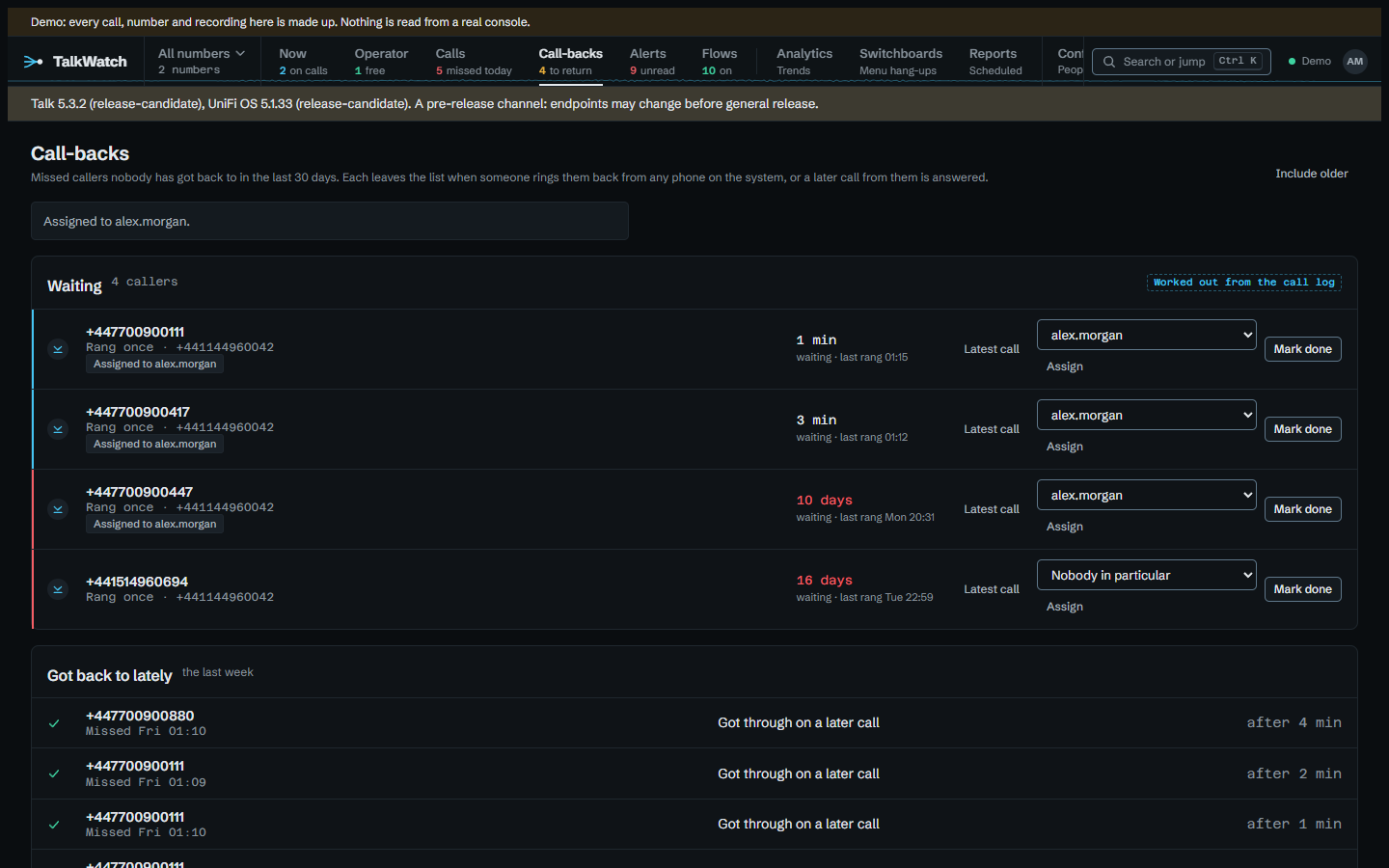
When it's clear who should ring someone, give them the caller: pick the person on the row and press Assign. The row then says Assigned to them, so two people don't both ring, and the assignment is audited, as marking done is. Latest call opens the call itself, to hear the voicemail or see the route before ringing.
A caller with a withheld number can't be on the list, since there's no number to ring. The page says how many of those there were, so they're at least counted.
Hearing about it before it goes amber
The list only helps if someone looks at it. A flow makes sure someone hears. The demo starts with this one, called Missed calls:
When    Missed call
Notify  whoever it rang, with Talk's summary
Wait    5 minutes for someone to acknowledge or call back
Notify  the manager, urgent
Whoever it rang is the person whose line it was, or the members of the ring group it rang, so the first message goes to the people who know the caller. The wait is the useful part. Ringing the caller back acknowledges the alert, so if anyone calls them within five minutes the flow stops there and the manager hears nothing. Only a caller still waiting goes further. The same shape with a longer wait, notify the desk, wait 60 minutes, notify the manager, means tell the manager if nobody has rung them back within the hour, without anyone having to write that rule down.
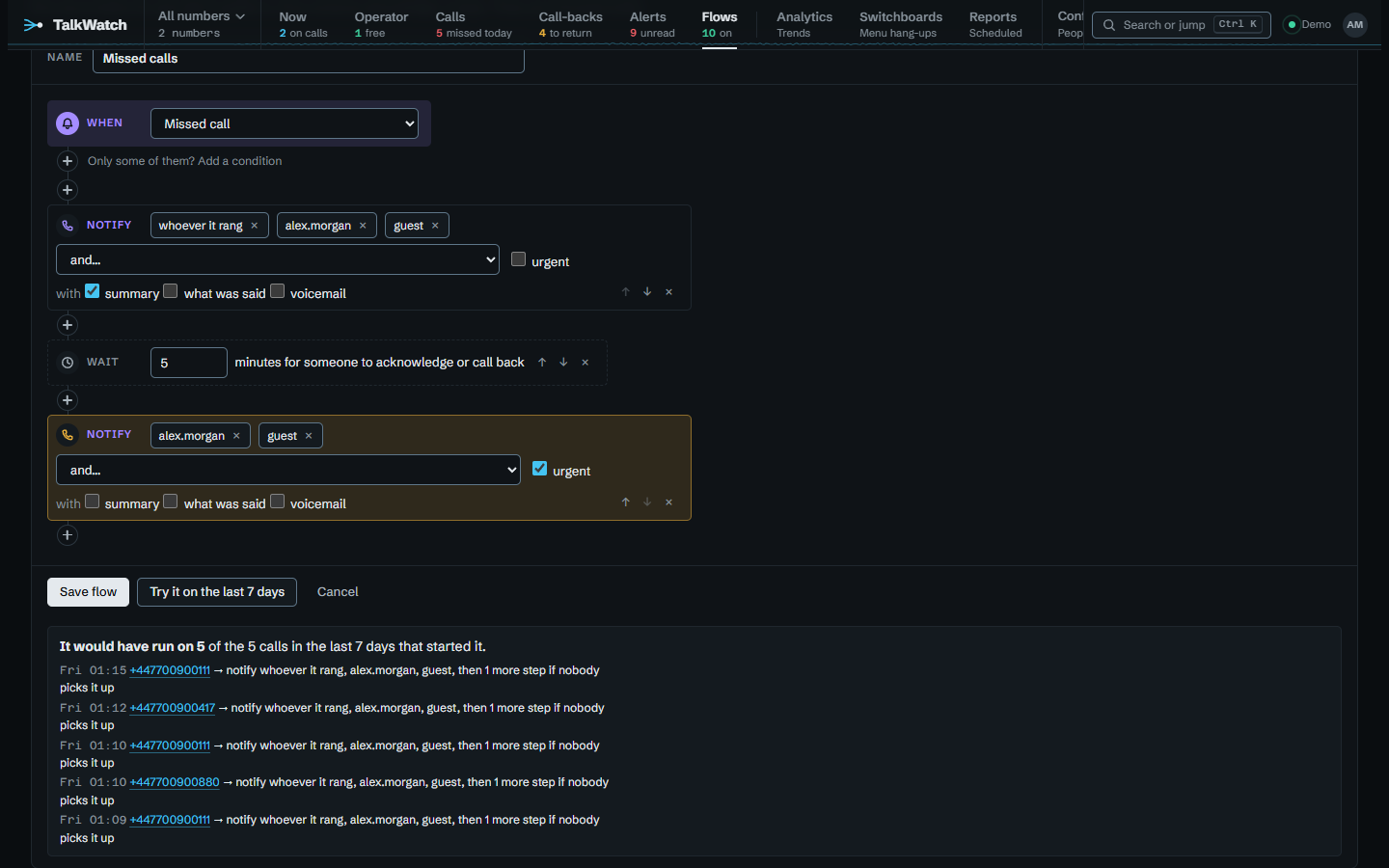
Try it on the last 7 days runs the flow against the past week's calls without sending anything, and lists who it would have told about which call. It's the quickest way to see whether a flow is about right before it's switched on, rather than finding out from a busy morning.
Callers worth a second look
Two more of the demo's flows pick out callers who've had a worse time than most:
- Callers who try again: the caller has rung twice in an hour. Someone ringing back that quickly usually needs something, so it notifies as urgent and assigns the call-back to one person, so it's clearly theirs.
- Callers we keep missing: the caller has gone unanswered twice in two hours. It sends Talk's summary and the voicemail with the alert, so whoever rings back knows why they called.
Both use conditions from the flow editor, If repeat caller and If the caller keeps missing us. A withheld caller can't be counted, so neither ever holds for one. The full list of conditions is under Alerts.
Knowing whether it's working
Analytics counts missed calls got back to, the median time to call back, and how many are still to call back. A week of those is the honest answer to "do we ring people back?", and it doesn't depend on anyone remembering to log it.
For a manager who'd rather have it arrive than go looking, the Call-back accountability report starts Monday at 08:00 with the week before: how quickly missed callers were called back, every missed call, who's still waiting, and who answered. See A report in the manager's inbox.
Try it in the demo
- Open Call-backs and give a caller to someone.
- From Try a scenario at the foot of the page, play Missed call alert. The example flows alert on it, and it lands on Now, in the pop-up and on Call-backs within a minute.
- Open the Missed calls flow under Flows and press Try it on the last 7 days.
See also
- Calls and call-backs for the list's rules.
- Alerts for every trigger, condition and step.
- Seeing a bad day coming, for when it's not one caller but the whole line.