Knowing when the phones themselves go wrong
Some problems aren't about any one call. A handset falls off the network and nobody notices until someone asks why reception's been quiet. A card payment fails and Talk suspends calling. Somebody switches call recording off while changing something else. A console update changes what Talk sends. Each of these is quiet when it happens and expensive when it's found, so each can raise an alert.
What can raise one
| Trigger | When |
|---|---|
| Handset offline | a handset that was online reports anything else |
| Handset can't take calls | a handset still online lost its registration, so it can neither make nor take calls. The one that looks fine on the desk |
| Handset update available | Talk has a firmware update waiting for a handset |
| Poor call quality | Talk scored a call under 70 of 100 for quality |
| Talk account problem | the account stops being active, calling is suspended, a payment fails, or the account is blocked, reports unauthorised use or goes into emergency mode. Once when each problem appears |
| Recording or transcription switched off | call recording or AI transcription goes from on to off in Talk |
| TalkWatch stopped copying calls | the console's responses changed shape, raised once, when it starts |
The account and settings are checked hourly, and what was last seen is kept, so a restart neither misses a change nor raises one twice. Recording that's off when TalkWatch first looks raises nothing, since it may be off on purpose.
The last three are about the whole site rather than any line, so only admins can build flows on them. A simple flow for each, to whoever looks after the system, is enough:
When    Talk account problem
Notify  IT (email), urgent
Handset offline
Only online has been seen from a console so far, so any other status counts
as offline. That may include a handset restarting for a firmware update.
Seeing it on the page
Now lists every handset with whether it's online, tagged where an update is waiting, and everyone's presence, from Talk's live feed. When that feed is down, the heading says so and what went wrong, and calls carry on being copied from the call log each poll.
When something's wrong with TalkWatch's view of the console, a strip appears under the rail on every page:
- Talk's data has changed shape: a console update changed what Talk sends, and TalkWatch has stopped copying new calls rather than store them wrong. It says when the console was updated and from which versions to which.
- The console couldn't be reached at the last poll, and what's shown is from the time it says.
- An untested Talk or UniFi OS version, or a pre-release channel, where endpoints can still change.
- Talk can't reach its cloud services, with Talk's reason and since when. Checked each poll, from Talk 5.4.5 on. Calls to and from outside numbers may not get through meanwhile; calls already made are still copied.
- Talk reports it is running degraded, and at what level, the moment the live feed says so (Talk 5.4.5 on).
Nothing's lost while copying is stopped: the console keeps its call log, and TalkWatch catches up once it can read it again. See Upgrading.
Call quality
Analytics carries Talk's quality scores: the median, how many calls scored under 70, and the worst calls, each a link to the call. A run of poor calls on one handset is a cable or a switch port; poor calls across the site at the same hour is the internet connection.
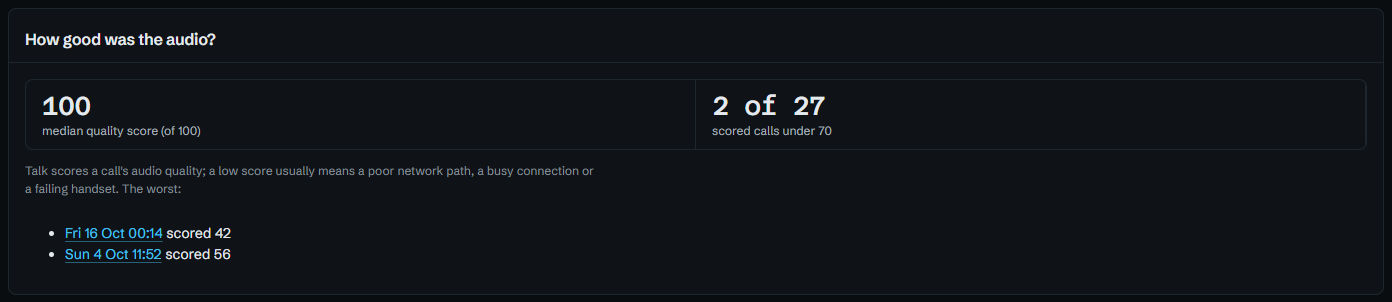
The call log shows each call's score too, in amber below 70.
Try it in the demo
The demo's Poor call quality flow notifies on every call Talk scores under 70. Its handsets and people are on Now; play Do not disturb or On a call from Try a scenario to watch someone's presence change.
See also
- What can raise an alert.
- Traces and metrics, for watching TalkWatch itself.